Why a small business needs AI governance
Your staff already use AI
ChatGPT, Copilot, Gemini and AI features inside other software arrive one sign-up at a time. Most businesses have no list of what is in use.
You are responsible for what goes into it
Customer details, pricing and contracts get pasted into AI tools. Governance means deciding which tools are approved, for what, and with which data.
People will ask how you manage it
Larger customers, insurers and auditors increasingly ask small suppliers how they control AI. A register with approvals and evidence is a clear answer.
See where your business stands at a glance
The overview shows how many AI systems you have, what is waiting for assessment or approval, your next actions and your governance maturity level.
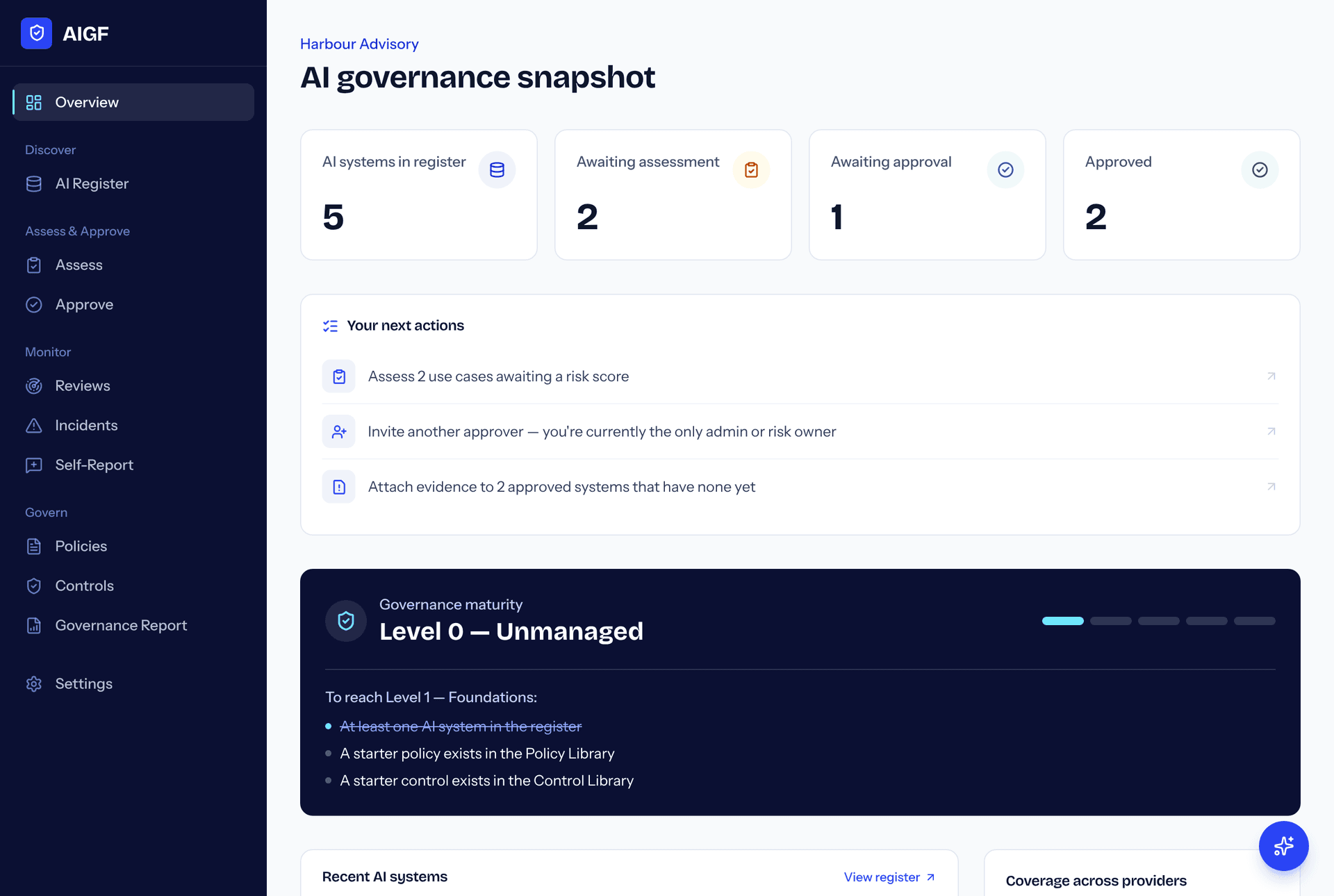
Sample data for an example business.
Five stages take each AI system from found to governed
- 1
Discover
Every AI system is identified through the discovery wizard, connectors, and employee reports.
- 2
Assess
Each system is scored on data sensitivity, business criticality, and regulatory exposure.
- 3
Approve
Risk owners approve, reject, or approve with conditions — with a timestamped audit trail.
- 4
Monitor
Ongoing signals are tracked against the approved state, and drift is flagged.
- 5
Govern
Policies and controls are attached and enforced through recurring review cycles.
One register for every vendor, with evidence behind each entry
Custodry is not tied to Microsoft, Google or AWS. It keeps Copilot, Gemini, Bedrock, Claude, ChatGPT and whatever comes next in one register, and records how each entry is known: observed by a connector, reported by staff, or verified by an owner.
- Microsoft
- Google Workspace
- AWS
- and every AI vendor after
What's inside the platform
- AI register
- One list of every AI tool and feature in use, with its owner, vendor and the data it touches.
- Automatic discovery
- Connect Microsoft 365, Google Workspace or AWS and Custodry finds AI tools for you.
- Risk assessment
- Rate each use on its potential impact and how much the AI can do by itself. You get one of four risk tiers and the controls that tier needs.
- Can I use this AI?
- Any staff member answers four questions and is told straight away if a use is already approved, or it goes to the person who decides.
- Approved uses
- A plain list of what AI staff may use and for what, with the conditions and owner for each approved use.
- Approvals
- Approve, approve with conditions or reject each use. Every decision is recorded with who and when.
- Policies and controls
- Keep your AI rules in one library and attach them to the systems they apply to.
- Reviews
- Schedule a review date for each system so approvals don't go stale.
- Task list
- Overdue reviews, waiting decisions and staff requests in one place, most urgent first.
- Incidents
- Log what went wrong with an AI tool and what you did about it.
- Staff self-reporting
- A simple form where staff tell you about AI tools they use that aren't on the list.
- Governance report
- A printable summary of your register, decisions and gaps for a board, customer or auditor.
- AI assistant
- Ask what to fix first or what is overdue. Answers come from your own register.
- Team roles
- Invite colleagues as admin, risk owner or member so governance doesn't depend on one person.
- Maturity level
- See which of five governance levels you have reached and what to do to reach the next.
Get started in three steps
- 1
Create your workspace
Sign up with your business name. It takes about a minute and the Free plan needs no card.
- 2
Add the AI tools you use
Tick the common tools you already use, add others by hand, or connect Microsoft, Google or AWS to find them automatically.
- 3
Assess and approve each one
Answer three questions per tool to get a risk rating, then record your decision. Your register is now evidence.
Connect the accounts you already have
Connecting is optional and read-only. The guide walks an administrator through each one, with screenshots.
Read the connection guidePlans that grow with your register
Start on the Free plan and stay as long as you like. Contact us when you are ready to connect cloud providers or bring your team in.
Free
For a business starting its first AI register.
A$0
- Up to 10 AI systems in the register
- Add systems by hand or from staff reports
- Risk assessment and approval
- No cloud connectors
Starter
For a team that wants AI tools found automatically.
A$49/month
- Up to 25 AI systems in the register
- 1 cloud connector (Microsoft, Google, or AWS)
- Policy & control library
- Approval workflow with audit trail
- Email support
Growth
Most popularFor organisations governing AI across multiple vendors and teams.
A$149/month
- Unlimited AI systems
- All cloud connectors (Microsoft, Google, AWS)
- AI governance assistant
- Team invitations with roles
- Governance report exports
- Priority support
Enterprise
For larger organisations with custom compliance and rollout needs.
Custom
- Everything in Growth
- SSO / SAML (planned)
- Custom data retention & SLAs
- Dedicated onboarding
- Dedicated success manager
Prices in Australian dollars, per month. The Free plan is available now. Paid plans are set up by contacting us while online payment is being built.
Common questions
- What counts as an “AI system” in the register?
- Anything from Copilot and ChatGPT to a custom model your team built on Bedrock or Vertex AI. If it processes data or makes decisions, it belongs in the register.
- Do we need to connect Microsoft, Google, or AWS to get started?
- No — the discovery wizard and employee self-reporting work without any connector. Connectors add automatic, ongoing discovery on top of that once you're ready.
- Can we change plans later?
- Yes, at any time — your register, policies, and history carry over exactly as they are.
- Is there a free trial?
- You don't need one. The Free plan has no time limit and covers up to 10 AI systems. Paid plans apply once you're ready to connect cloud providers or invite your team.
Build your AI register today
Free to start. Connect your first cloud provider in minutes.